The Board
Read Pulse AI board state as the operating source of truth for dispatch, blockers, review, and done.
Last reviewed
How the operating surfaces connect
| Related topic | What it helps you do | Best starting point | Proof to inspect |
|---|---|---|---|
| Workday | Run eligible work from the board | Session signals | Workday screenshot |
| Dispatch | Move selected work into a pool or direct run | Duplicate safeguards | Dispatch diagram |
| Board | Decide what status means | Lifecycle flow | Status flow visual |
| Review Queue | Convert evidence into the next board move | Verdicts and movement | Review checklist |
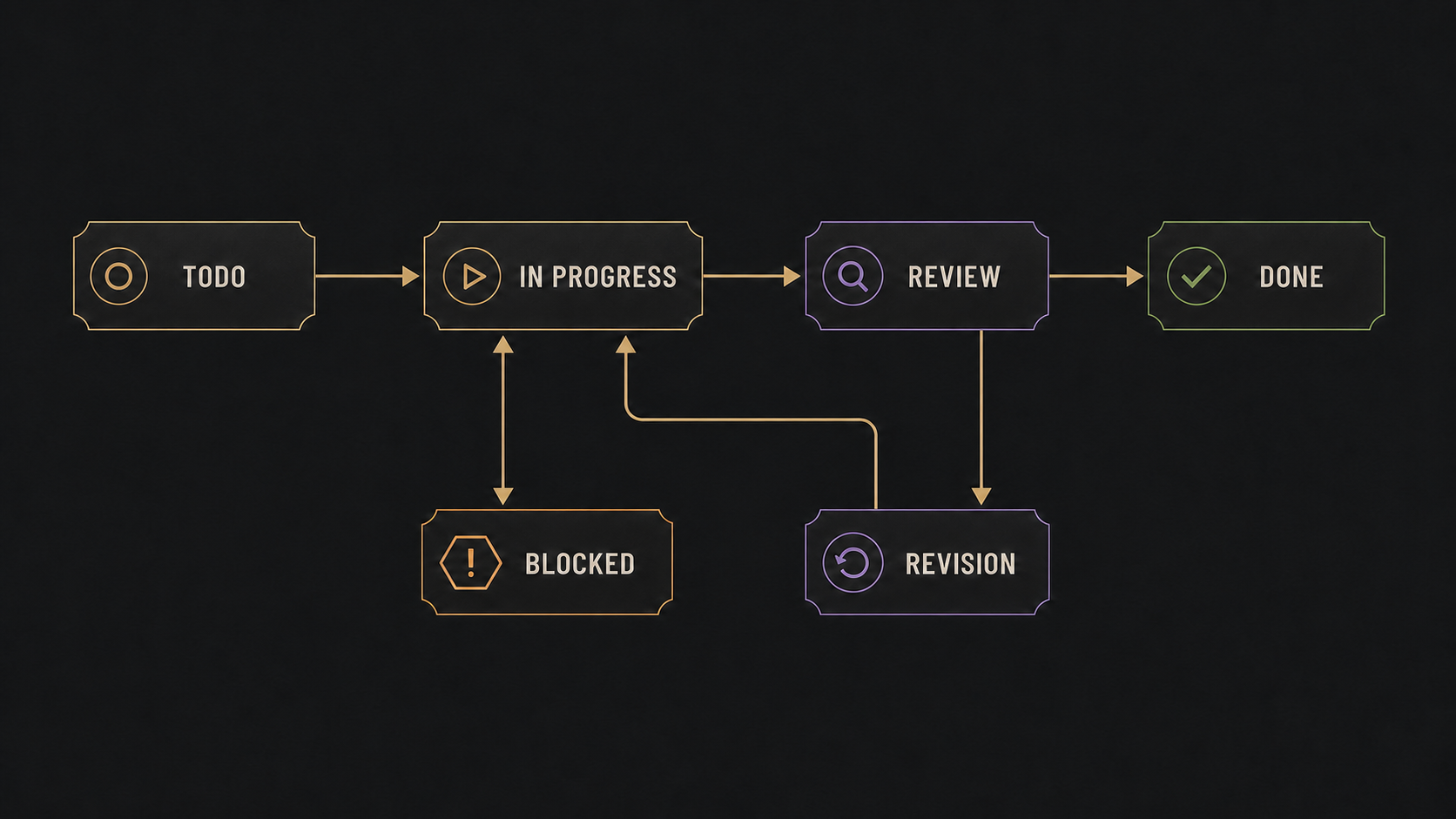
Read status as an operating signal
The board is the durable ledger. Each item should name the request, owner role, dependencies, acceptance criteria, validation evidence, deliverables, review history, and lifecycle timestamps.
Status tells the dispatcher and the operator what can happen next. Treat status as an instruction, not decoration:
- todo: planned work that can dispatch when dependencies allow.
- in-progress: work currently owned by an agent or active session.
- blocked: work waiting for a prerequisite, decision, provider, or proof.
- review: agent-submitted work waiting for approval or revision.
- done: work approved after review.
Lifecycle flow
The primary path is todo → in-progress → review → done. Two branches protect the accuracy of that path: active work can pause in blocked and resume in in-progress, while a needs revision verdict returns reviewed work to in-progress for the same owner to correct.
Blocked is not a failure state. It protects order when dependencies are real. Review is not done. It means the work has been submitted and needs a verdict.
Dependency and blocker rules
Dependencies decide whether downstream work is eligible to run. Before dispatching QA, launch copy, or public-surface proof, check that the upstream implementation and review state are current.
Blocked items stay on the board, but they should not enter an active dispatch pool until the blocker is resolved. A blocker can be an unfinished prerequisite, a review verdict, a missing decision, failed validation, provider access, or proof that still needs to be captured.
When a blocker exists, update or dispatch the existing owner when possible. Create a new task only when no current item owns the missing decision, source fix, media capture, validation script, or launch proof.
Review movement on the board
A review verdict changes the next dispatch:
- Approved: the user or delegated lead can move the item to done.
- Needs revision: dispatch the existing owner with the review findings.
- Rejected: keep the findings on the same item and create a focused owner only if the current task cannot safely absorb the correction.
Do not erase prior review notes. They are part of the operating record.
Recovery
If the visible board disagrees with a task file, reload the workspace and inspect the canonical item before creating or moving anything. Preserve review notes and dependency fields while repairing the narrow stale state.
If an item is stuck in progress, check the active owner, dispatch attempt, blocker, and latest evidence. Resume or revise the existing item when possible; a duplicate task hides the original lifecycle and makes review less trustworthy.